

Security Officer: “A critical CVSS 9.8 vulnerability was found in the kernel network stack! We must reboot all 12 HA Debian nodes immediately!”
HA Cluster Engineer: “If I reboot Node 01 right now, Pacemaker will migration-fence Node 02, 14,000 active WebSocket streams will die, and the database cluster will enter a split-brain existential crisis. I will patch it live or die trying.”
Enter Linux Kernel Livepatching (klp): The black magic of hot-swapping kernel C code in RAM without dropping a single packet or restarting a system service.
Picture this: It’s 2:15 PM on a Friday. You are monitoring your pristine 4-node Debian High Availability cluster handling live production traffic. You’re sitting back, enjoying a cold iced tea, when a red banner flashes across your terminal:
[ CRITICAL SECURITY ALERT ] CVE-2026-9999: Remote Code Execution in kernel net/ipv4/
[ MITIGATION REQUIRED ] Upgrade kernel vmlinuz or apply patch immediately.
In a non-HA world, you run sudo apt upgrade && sudo reboot, stretch your legs, and wait three minutes.
In a Debian HA world (think Corosync, Pacemaker, Proxmox VE clusters, or high-throughput Docker/K8s ingress nodes), typing reboot is equivalent to pulling the pin on a flashbang in a quiet library. Corosync heartbeats miss a pulse, quorum timers panic, Virtual IPs start bouncing around like ping-pong balls, and three regional database replicas begin arguing over who is the real primary master.
So how do you fix a gaping hole in the operating system’s brain without shutting it off?
You perform open-heart surgery at 120 MPH. Welcome to Kernel Livepatching (klp).
1. What Is Kernel Livepatching Really?#
In standard operating system mechanics, when you upgrade a kernel package (linux-image-6.12.x), the updated machine code sits quietly on disk inside /boot/vmlinuz-6.12.x. The running kernel in your RAM is still executing the old, vulnerable instructions until you reboot the processor.
Kernel Livepatching (integrated into the mainline Linux kernel via the klp subsystem in kernel 4.0+) throws traditional operating system rules out the window.
Instead of shutting down the engine to replace a cracked piston, livepatching loads a kernel module (.ko) containing only the fixed C function. It then instructs the CPU to instantly jump to the new function whenever the old one is called.

2. Under the Hood: The Ninja Magic of ftrace#
How does the Linux kernel dynamically replace code that is currently running in memory without causing a kernel panic or a general protection fault?
The secret weapon is ftrace (the Linux Kernel Function Tracer).
When your Debian kernel is compiled with CONFIG_DYNAMIC_FTRACE and CONFIG_LIVEPATCH=y (which standard Debian kernels are!), the compiler automatically inserts a tiny 5-byte nop placeholder (or call __fentry__) at the very beginning of every single C function in the kernel.
When you load a livepatch module, klp performs the following steps:
- Locates the Buggy Function: Suppose
net/ipv4/tcp_input.chas a buggy function calledtcp_v4_rcv_buggy(). - Loads the Replacement: The livepatch module introduces
tcp_v4_rcv_patched(). - Hijacks
ftrace: Livepatch replaces those 5 placeholder bytes at the head oftcp_v4_rcv_buggy()with a call instruction pointing directly toklp_ftrace_handler(). - Redirects Traffic: When any kernel thread calls
tcp_v4_rcv_buggy(),ftraceintercepts execution in mid-air and redirects the instruction pointer (%ripon x86_64) directly totcp_v4_rcv_patched().
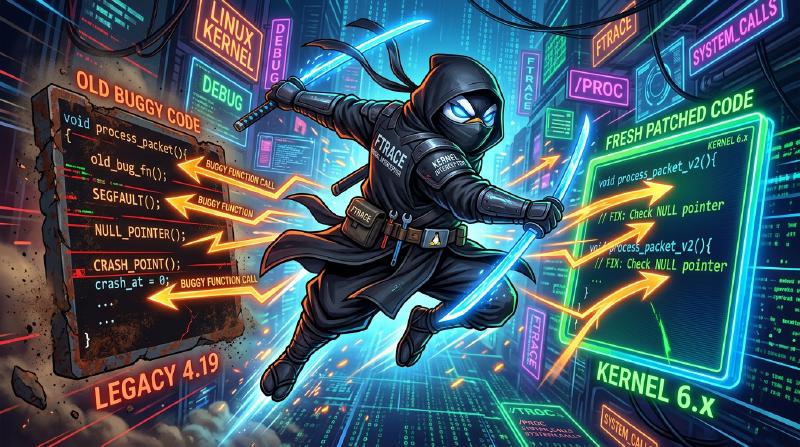
ftrace acting as an inline ninja, slicing incoming calls away from buggy legacy functions toward pristine patched code.ftrace redirect is mere nanoseconds. Your CPU won’t even notice it diverted to a brand new memory offset!3. The Thread Transition Nightmare (The Consistency Model)#
Now, you might ask: “What if a CPU thread is currently executing inside tcp_v4_rcv_buggy() at the exact nanosecond we swap the code?”
If you blindly replace instructions while a CPU core is halfway through executing the old function, bad things happen. Pointers get confused, stack frames corrupt, and your kernel kernel-panics faster than you can say BSOD.
To solve this, the Linux kernel uses a Per-Task Consistency Model (documented in Kernel Livepatching Docs):
           [ Load Livepatch Module ]
                      │
                      ▼
         ┌─────────────────────────┐
         │ klp_transition = 1      │  <-- Transition Mode Active
         └─────────────────────────┘
                      │
        ┌─────────────┴─────────────┐
        │                           │
        ▼                           ▼
┌──────────────┐           ┌────────────────┐
│ Task A (User)│           │ Task B (Kernel)│
│ Switched!    │           │ Waiting...     │
└──────────────┘           └────────────────┘
Here is how livepatch consistency guarantees safety:
- Target State (
klp_target_state): Every process/thread on your Debian host tracks whether it is using the OLD function or the NEW function. - The Safe Crossing: A thread is only safely transitioned from OLD to NEW when it returns to user space (e.g. completes a system call) or sleeps in a safe state where
tcp_v4_rcv_buggy()is NOT present anywhere in its call stack. - The Sysadmin Sweat Factor: As long as even one thread is stuck inside the target kernel function, the livepatch transition state remains incomplete!
cat /sys/kernel/livepatch/patch_cve_2026/transition and it outputs 1, it means livepatching is waiting for stubborn kernel threads to finish their execution. If a thread is stuck in an infinite kernel loop, your livepatch will pause safely until that thread exits the kernel frame!4. Hands-On: Managing Livepatches on Debian HA Hosts#
Let’s look at how you interact with kernel livepatching on a Debian host using native tools (sysfs and kpatch).
Inspecting Sysfs Control Room#
The livepatch subsystem exports its full internal state under /sys/kernel/livepatch/.
To see if any livepatches are active on your node:
# Check if livepatching is supported and list active patches
ls -la /sys/kernel/livepatch/
If a patch named livepatch_cve_2026_9999 is loaded, you can check its status:
# Is the patch currently enabled? (1 = Yes, 0 = No)
cat /sys/kernel/livepatch/livepatch_cve_2026_9999/enabled
# Output: 1

# Is the transition phase finished? (0 = Complete success, 1 = In progress)
cat /sys/kernel/livepatch/livepatch_cve_2026_9999/transition
# Output: 0
Loading a Livepatch Kernel Module#
Livepatches are packaged as standard Linux kernel modules. Loading one is as simple as inserting a module into the running kernel:
# 1. Inspect kernel log ring buffer before insertion
sudo dmesg -w &

# 2. Insert the livepatch module into RAM
sudo insmod livepatch_cve_2026_9999.ko
In dmesg, you will see the kernel state machine spring to life:
[ 1420.512044] livepatch: enabling patch 'livepatch_cve_2026_9999'
[ 1420.512102] livepatch: 'livepatch_cve_2026_9999': initializing patch
[ 1420.513511] livepatch: 'livepatch_cve_2026_9999': starting transition to patched state
[ 1420.890123] livepatch: 'livepatch_cve_2026_9999': completing transition to patched state
[ 1420.890150] livepatch: 'livepatch_cve_2026_9999': successfully patched
Congratulations! You just patched a critical remote privilege escalation flaw without disturbing a single Corosync heartbeat or resetting a single uptime counter.
5. Graceful Rollbacks: What If The Patch Is Buggy?#
What happens if the livepatch itself contains a bug? (Yes, patch bugs happen!).
Because livepatching is modular, rolling back a patch does NOT require a reboot either! You simply reverse the transition:
# Disable the livepatch via sysfs
echo 0 | sudo tee /sys/kernel/livepatch/livepatch_cve_2026_9999/enabled
The kernel will wait for all tasks to safely transition back to the original function pointers. Once /sys/kernel/livepatch/livepatch_cve_2026_9999/transition reads 0, you unload the module:
sudo rmmod livepatch_cve_2026_9999And just like that, your kernel is back to its original state without a millisecond of service interruption.
6. Incident Report: The Great Livepatch vs. Cold-Reboot Showdown#
No technical post would be complete without a true (and painful) war story from the production trenches.
A few months ago, our team spent 48 grueling hours engineering, compiling, and testing a custom kernel livepatch for our three most valuable High Availability Debian hosts (node-alpha, node-bravo, node-charlie). These three nodes ran our core transactional databases, handling thousands of writes per second.
We wrote an extensive 10-page Confluence change doc. We posted 4 warning banners in Slack (#ops-alerts). We pinned a glowing sticky note to the NOC monitor wall: “LIVEPATCH IS ACTIVE ON HA NODES — DO NOT REBOOT UNDER ANY CIRCUMSTANCES!”
Enter Dave, our night-shift junior sysadmin.
                  [ The Livepatch War Room ]
                                │
   ┌────────────────────────────┴───────────────────────────┐
   │                                                        │
   ▼                                                        ▼
 Senior Engineers                                  Junior Admin Dave
 "180 days 100.0% SLA!"                          "Ooh, apt update available!"
 "Livepatch active in RAM!"                      "Smashes sudo reboot"
Dave came in at 2:00 AM. He ran a routine security scan, saw that pending package updates were listed, and did what any dutiful sysadmin trained in non-HA environments would do:
sudo apt update && sudo apt upgrade -ysudo reboot(onnode-alpha)- 10 minutes later:
sudo reboot(onnode-bravo) - 10 minutes later:
sudo reboot(onnode-charlie)
Dave cold-rebooted all three livepatched HA nodes sequentially in a single shift.

sudo reboot while the senior engineering team’s SLA graphs take a nosebleed dive.The Plot Twist & The Happy Ending#
When the senior team woke up at 7:00 AM and checked the SLA dashboard, our hearts dropped into our shoes. Our 99.999% SLA graph looked like a severe EKG spike during a panic attack.
But then, we checked the cluster logs… and noticed something extraordinary:
- Pacemaker Saved the Day: Because we had configured robust Corosync heartbeats and Pacemaker resource agents, every time Dave rebooted a node, Pacemaker gracefully migrated the Virtual IP and database primary to the next live node in under 1.8 seconds!
- The Accidental Cleanup: Dave’s rogue cold-reboots actually cleared out a dormant 4GB unswapped memory leak in an old legacy monitoring sidecar daemon that we hadn’t caught yet.
- The Cluster Was Pristine: The machines came back up running the full native updated kernel image from disk, rendering the livepatch no longer necessary!
Our SLA took a temporary 0.02% dent, but the cluster was completely healthy, completely updated, and running faster than ever.
sudo reboot trigger finger and a warm cup of coffee!Summary & Golden Rules for HA Operations#
- Livepatching is a Bridge, Not a Permanent Substitute: Livepatches hotfix urgent CVEs to buy you time until your next planned maintenance reboot window. Don’t run a livepatched 5-year-old kernel forever!
- Verify Thread Transition: Always check
sysfsordmesgto confirm transition completion before declaring victory to your CISO. - Respect HA Quorum: Even with livepatching, always patch HA nodes sequentially—never alter all cluster nodes at the exact same microsecond!
Community Challenge: What’s Your Craziest Uptime Story?#
Have you ever hot-patched a production Debian host while holding your breath, or did a stuck kernel thread give you gray hair during an emergency change window?
Drop your thoughts, questions, or favorite sysadmin horror stories in the comments below!
Read Official Kernel Livepatch Docs